A deep, flexible, character-rich piano that quietly becomes a workhorse
When I first opened Broadcast Piano, I honestly didn’t know what to expect.
On paper, it looks deceptively simple: one piano, a minimal interface, a handful of macro controls, and a clear aesthetic connection to mid-century broadcast recording. At €89, it’s also not a throwaway purchase for a single piano library—so it needs to earn its place.
What surprised me most is that Broadcast Piano is far less about “a vibe” than it initially appears, and far more about range, control, and adaptability than I expected.
This ended up being a much broader instrument than I went in expecting.
What Is Broadcast Piano?
Broadcast Piano is a sampled grand piano library by Teletone Audio, built around vintage broadcast recording techniques—specifically ribbon microphones commonly used in television and radio studios of the 1950s–1970s.
At the heart of the library is a Baldwin grand piano, captured with an emphasis on:
- immediacy
- intimacy
- controlled space
- tonal personality without gimmicks
It runs in the free Kontakt Player, installs via Native Access, and weighs in at around 13 GB, which already hints that this isn’t a lightweight or superficial sampling job.
First Impressions
Cleaner than expected, fuller than anticipated
The very first thing that caught me off guard was how clean and balanced the initialized patch is.
“I was kind of expecting this to be darker, maybe leaning a bit more lo-fi, but the initialized sound is actually very clean, full, pristine, and extremely well balanced.”
Given the ribbon mic and broadcast framing, I was expecting something darker, more overtly lo-fi, or at least immediately “colored.” Instead, the default sound is:
- full
- even across the frequency range
- clear without sounding clinical
- detailed without harshness
Importantly, it avoids a common piano problem: that hollow, honky, muddy midrange that so many sampled pianos struggle with. The tone holds together extremely well from low end to top.
“This is super clear and pristine throughout. There’s no hollow, honky, or muddy area where the piano suddenly collapses.”
This already puts Broadcast Piano in a strong position before touching any controls.
The Interface Philosophy
Few controls, but they matter
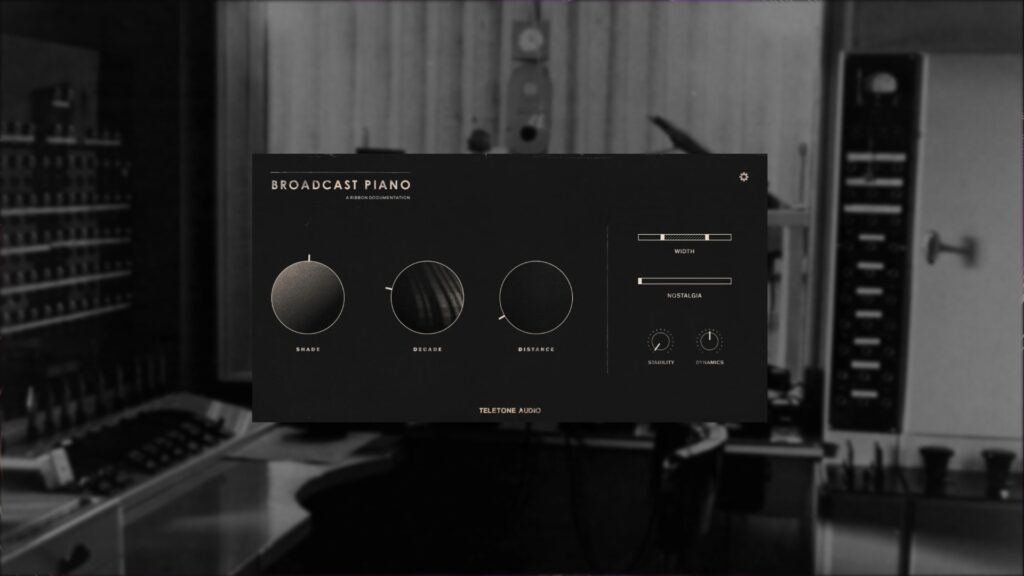
At first glance, the interface almost feels too minimal:
- Shade
- Decade
- Distance
- Nostalgia
- Stability
- Dynamics
- Width
- Velocity curve and mechanical controls
If you’re used to deep mic mixers, multi-page editors, or surgical control panels, this might feel restrictive.
But the key thing here is that each control is doing meaningful, musically tuned work. These are not arbitrary macros. Each one shifts multiple aspects of the sound in a coherent, intentional way.
You’re not sculpting surgically—you’re steering.
Core Sound and Playability
Expressive, predictable, and well scripted
From a performance standpoint, the piano feels:
- responsive
- consistent
- well scripted
- dynamically predictable
There’s no sense of fighting the instrument or guessing how it will react. Velocity transitions are smooth, and the tonal response feels intentional rather than random.
“I don’t feel like I’m fighting the instrument at all.”
One thing I noticed early on is that the piano tends to prefer a slightly more assertive playing style out of the box. Ultra-delicate playing requires some adjustment—but that’s where the dynamics and velocity curve controls become crucial.
Once dialed in to your keyboard and playing style, the expressive range is absolutely there.
The Character Controls Explained
Nostalgia
This is where Broadcast Piano starts revealing its depth.
Nostalgia isn’t a smooth continuous blend—it works in fixed steps, which strongly suggests that we’re dealing with curated sample states rather than a simple effect overlay.
“At higher nostalgia settings, it turns into a completely different instrument.”
As you increase nostalgia:
- transients become more pronounced
- resonance becomes more complex
- the sound moves toward clangy, metallic, almost una corda-like territory
- texture starts to dominate over purity
At higher settings, the piano can convincingly move into deep lo-fi, characterful, almost prepared-piano-adjacent territory—without losing musical usefulness.
Stability
Stability introduces pitch wobble and movement, reminiscent of tape or mechanical instability.
What I appreciate here is restraint. Even at higher values, the effect never becomes obnoxious or unusable. It’s clearly tuned for musical context, not sound-design excess.
This pairs beautifully with nostalgia for subtle motion and age.
Shade
Shade acts as a true tonal sculptor, not just brightness. In reality it’s controlling microphone perspectives, but sound-wise it affects:
- presence
- transient sharpness
- perceived proximity
- tonal weight
Rather than simply boosting highs, it reshapes how the piano sits forward or back in the mix.
Decade and Distance
These controls handle:
- stereo VS mono
- saturation and distortion
- spatial depth
Decade, in particular, introduces saturation and harmonic density, and yes—if pushed hard, you can get properly dirty sounds out of this piano.
Distance gives you a beautiful sense of space without pushing the piano into a washy, disconnected room sound. It stays grounded.
Mechanical and Performance Controls
Surprisingly important
Beyond tone, Broadcast Piano gives you control over:
- velocity curves
- hammer noise
- release noise
- sustain pedal behavior
These aren’t just “nice extras.” They meaningfully affect how playable and expressive the instrument feels.
One standout aspect is the low-end behavior. Many pianos can sound impressive down low, but few manage to feel juicy without becoming overwhelming or disconnected from the rest of the piano tone. Broadcast Piano pulls this off exceptionally well.
Presets
Not just demos—actual learning tools
The presets deserve special mention.
Rather than a random grab bag of cobbled-together effects, the presets are a tightly curated collection of sound states that clearly demonstrate the instrument’s creative and textural depth. They include:
- radically different velocity curves
- dynamic behaviors
- textural balances
- performance feels
Even if you never use a preset directly, they’re extremely valuable as educational starting points. They show you what the engine can do—and how the controls interact.
This is one of those libraries where presets don’t just sound great, they actually teach you the instrument.
“They really show you the relationship between velocity curves, dynamics, and tone.”
Is This a “Workhorse Piano”?
Yes—and I mean that as a compliment.
Broadcast Piano can be:
- clean and modern
- intimate and expressive
- textured and nostalgic
- dark and degraded
- cinematic
- minimal
- character-driven
Crucially, it can do all of this quickly.
“I honestly think this could be a true workhorse piano—without losing character.”
You’re not buried in menus. You’re not tweaking endlessly. You make a few intentional moves, and the piano lands where you need it.
That speed and flexibility is what makes this a genuine workhorse—not because it’s bland, but because it’s adaptable without losing identity.
Final Verdict
I went into Broadcast Piano expecting a niche, vibe-specific instrument.
What I found instead was one of the more versatile piano libraries I’ve used in a long time, especially in the context of modern composition, sound-driven writing, and hybrid scoring.
“If you were only going to get one piano sample library, this should absolutely be in that conversation.”
At €89, it’s not trivial—but it earns that price by offering:
- depth without complexity
- character without gimmicks
- flexibility without sterility
If you’re looking for one piano that can move between clean, characterful, cinematic, and experimental contexts, Broadcast Piano absolutely deserves to be in the conversation.
This is a serious instrument.
Prefer Video?
Full Deep Dive: https://youtu.be/PhMTwOxRjfE