A deep-dive review of sonible’s intelligent compressor plugin for mixing and mastering
sonible’s smart:comp 3 isn’t just another compressor update — it’s a rethink of how compression can be understood, navigated, and applied musically, especially when working fast across complex sessions.
As someone who’s used sonible tools heavily for years — and who already relied a lot on smart:comp 2 — this release feels less like a cosmetic refresh and more like a meaningful evolution. Version 2 was already a big step up from the original. Version 3 pushes the concept further by making compression less about numbers and more about intent.
At its core, smart:comp 3 is a spectro-dynamic compressor: it combines traditional broadband compression with intelligent, frequency-aware behavior, wrapped inside an interface that actively guides you toward musically viable results.
And crucially: it does this without taking control away from you.
A Compressor Built Around Intention, Not Guesswork
One of the most refreshing things about smart:comp 3 is its philosophy. Instead of throwing ratios, thresholds, and time constants at you and hoping you already know what to do, it starts from a more musical question:
What kind of compression do you want this signal to have?
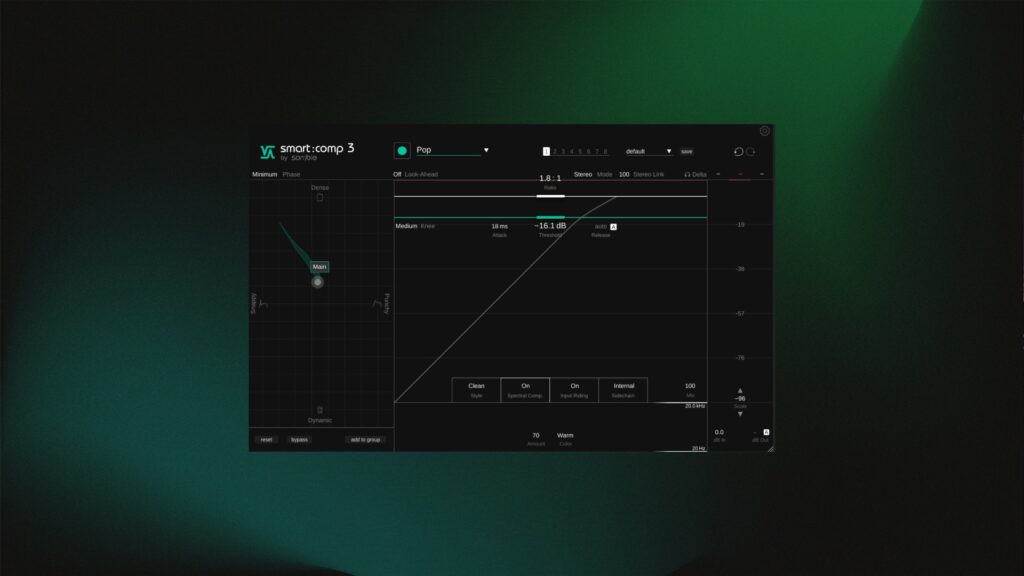
The new Compression Matrix visualizes this beautifully. Rather than dialing in parameters blindly, you move within a clearly defined space between four musical characteristics:
- Snappy – fast, transient-focused compression
- Punchy – slower, weightier compression emphasizing body
- Dynamic – open, natural compression preserving movement
- Dense – stronger smoothing and glue
The plugin analyzes your signal and shows you a green “zone of viability” — essentially the range where compression is likely to work well for that specific material. You’re free to explore within it, but you’re not left guessing in the dark.
“It gives you a territory of viability — a better starting point than just looking at numbers you don’t understand.”
What’s especially clever is that manual tweaks feed back into the matrix. Move the threshold, attack, or ratio manually, and the matrix thumb updates accordingly. That makes smart:comp 3 quietly educational as well — you start learning why certain settings sound the way they do.
Learning the Source (Without Locking You In)
The Learn function remains central to the workflow. You select the source type (drums, bass, vocals, piano, guitar, synth, speech, etc.), hit Learn, and play the material. smart:comp 3 listens and builds a compression profile based on that input.
Importantly, this doesn’t lock you into an “AI sound.” You can bypass learning entirely, adjust everything manually, or combine both approaches. It’s guidance, not automation for automation’s sake.
“You don’t really want to be locked into one approach — and smart:comp lets you hop off the algorithmic path whenever you want.”
This makes the plugin a genuinely professional tool — not a one-trick solution, but something flexible enough to meet real-world mixing and mastering demands.
Spectral Compression That Finally Feels Mature
Spectral compression is where smart:comp 3 really distances itself from traditional compressors — and where this version makes its biggest leap forward.
Think of it as an ultra-sensitive, automatic multiband compressor that responds dynamically across the frequency spectrum. In practice, it behaves somewhere between compression, EQ, and resonance control.
In earlier versions, spectral processing could feel a bit heavy-handed. In smart:comp 3, it’s noticeably more refined.
“This sounds a lot more natural, refined, and mature than what I’ve heard before.”
On drums, it tightens the kit without dulling transients.
On bass, it reins in low-end buildup without killing weight.
On piano, it smooths resonance and dynamic spikes without choking the instrument.
And because spectral compression is directly tied to the main compression behavior, it tends to produce a more cohesive result than stacking separate tools.
“It creates a tighter, more polished result — and it can take care of issues you don’t necessarily want to or can fix with EQ.”
The ability to push the Amount beyond 100% (up to 150) is also smartly handled. Below 100%, things stay natural and controlled. Beyond that, the effect becomes more obvious — thinner, snappier, more characterful — useful when you want the effect to be heard.
Styles, Saturation, and Character
smart:comp 3 includes multiple compression styles — Clean, Smooth, Aggressive, and Custom — each with subtly different attack/release behavior and saturation characteristics.
These aren’t gimmicks. They meaningfully change how the compressor reacts.
- Clean works beautifully on already well-defined sources, or when a more natural, uncolored sound is the goal.
- Smooth adds cohesion and a sense of polish
- Aggressive pushes saturation and density in a controlled way
“The styles make it far more versatile — especially when you want the compressor to add grit and character.”
Custom mode lets you shape the saturation curve yourself, a welcome — and often necessary — option when you want control over tone rather than just dynamics.
Input Riding & Zero-Latency Options
Two under-the-radar features deserve mention:
- Input Riding automatically stabilizes long-term level variations before compression for more consistent results, while also often making a meaningful difference to tonal balance and texture.
- Zero-Latency Mode allows smart:comp 3 to be used during tracking or live setups
For mixing and mastering, linear-phase operation is available when latency isn’t an issue — a practical, professional option that shows Sonible understands the differing demands of live and offline workflows.
Group Mode: Compression as a Mix Tool
One of the most powerful additions in smart:comp 3 is Group Mode. You can link up to seven instances and control them from a single window — adjusting threshold, ratio, attack, release, mix, and even matrix position together.
This opens up genuinely new workflows.
Instead of grouping by instrument type, I often prefer to group by song section — verse, chorus, bridge — and shape how all elements behave together in that context.
“This feels like stem-style mixing inside the plugin — a very powerful way to make elements sit together.”
You can move multiple instances at once inside the compression matrix, or fine-tune individual elements when needed. You may not use batch movement constantly, but having the option is valuable.
Real-World Results Across Multiple Sources
Across drums, bass, piano, guitars, synths, and speech, smart:comp 3 consistently delivered:
- Tighter dynamics without choking the source
- Better low-end control without losing weight
- Improved clarity and focus in dense arrangements
Even on difficult material — heavily effected guitars or noisy synths — dialing back spectral processing and leaning on traditional compression still produced useful results.
“Even without the spectral side, the compression alone takes care of unruly peaks and makes things sit better.”
That flexibility is key.
Pricing, Trials, and Loyalty Done Right
Sonible deserves genuine praise here.
- 30-day full trial — no limitations
- Generous upgrade pricing for existing users (check yours on the Sonible website)
- 40% educational discount
- Hefty intro pricing discount
“€29 to upgrade from the previous version is an insane no-brainer. This actually makes loyalty feel like loyalty.”
This pricing model builds trust — and frankly, more companies should take notes.
Final Thoughts
smart:comp 3 doesn’t try to replace your ears. It supports them.
It gives you better starting points, clearer feedback, and faster paths to musically solid results — while still allowing full manual control when you want it.
For mixing engineers, producers, composers, and anyone juggling complex sessions, it’s one of the most thoughtfully designed compressors available today.
“This is one of those tools that genuinely helps you get to a more mature, polished result faster.”
Prefer video?
🎛️ Editorial Product Review: https://youtu.be/m9wlCA8mRlU
📺 Full review: https://youtu.be/BI2FtMGEP08
🤫 “No talking” demo: https://youtu.be/0CHxXTMnt-g